
PHP Project
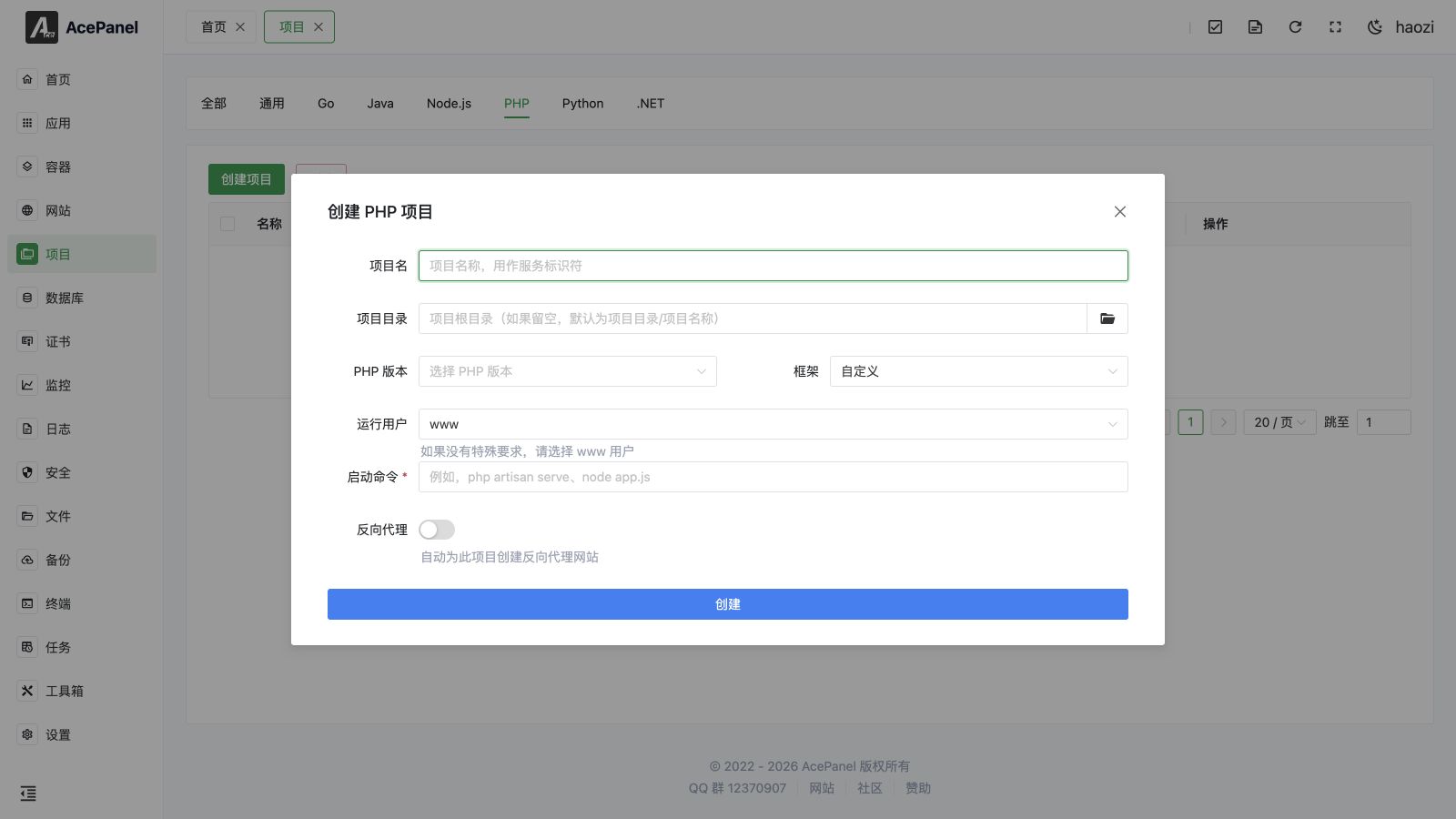
PHP projects are used to deploy PHP applications that require long-running processes, such as Laravel Octane, Swoole, Workerman, etc.
Tip
Traditional PHP-FPM applications (such as WordPress, Laravel) should be deployed using PHP Website, not as projects.
How It Works
Every project is managed as a systemd service (Type=simple). When you create a project, AcePanel generates a unit file at /etc/systemd/system/<name>.service, so starting, stopping, restarting, autostart, automatic restart on failure and log collection are all handled by systemd.
Because systemd runs the start command directly (not through a shell), the command does not support shell features such as cd, &&, pipes or inline environment variable prefixes. Relative paths in the start command (for example server.php) are resolved against the Working Directory, which defaults to the project directory. Set environment variables and the working directory by editing the project after creation.
Use Cases
- Laravel Octane (Swoole/RoadRunner)
- ThinkPHP
- Webman
- Hyperf
- Swoole applications
- Workerman applications
- Other PHP applications requiring long-running processes
When creating a PHP project, the create dialog provides framework presets (Laravel Octane, Laravel Artisan Serve, ThinkPHP, Webman, Hyperf, Swoole HTTP, RoadRunner). Pick the PHP version and a preset to auto-fill the start command, or choose Custom to write your own.
Prerequisites
- Install PHP runtime: Apps > Runtimes > PHP
- Install Swoole or other extensions as needed
Deploying Laravel Octane
Creating a Project
- Create project:
- Project Name:
myapp - Project Directory:
/opt/ace/projects/myapp(if left empty, defaults to the project path setting plus the project name) - Run User: User the service runs as (defaults to
www) - Start Command:
php84 artisan octane:start --host=0.0.0.0 --port=8000
- Project Name:
- Enable Reverse Proxy to automatically create a reverse proxy website for this project
Startup Command Examples
# Laravel Octane (Swoole)
php84 artisan octane:start --host=0.0.0.0 --port=8000

# Laravel Octane (RoadRunner)
php84 artisan octane:start --server=roadrunner --host=0.0.0.0 --port=8000

# Swoole HTTP Server
php84 server.php

# Workerman
php84 start.php start

# RoadRunner
php84 vendor/bin/rr serve

# Laravel Queue Worker
php84 artisan queue:work
Swoole Application Example
<?php
$server = new Swoole\HTTP\Server("0.0.0.0", 9501);

$server->on("request", function ($request, $response) {
    $response->header("Content-Type", "text/plain");
    $response->end("Hello World");
});

$server->start();
Startup command: php84 server.php
Workerman Application Example
<?php
require_once __DIR__ . '/vendor/autoload.php';

use Workerman\Worker;

$worker = new Worker("http://0.0.0.0:8080");
$worker->onMessage = function($connection, $request) {
    $connection->send("Hello World");
};

Worker::runAll();
Startup command: php84 start.php start
Queue Processing
Laravel Queue Worker can also run as a project:
php84 artisan queue:work --tries=3Managing the Project
Each project is listed on the Project page with its status (Running / Stopped / Failed / Inactive), type, autostart state and directory. The following actions are available per row:
- Start / Stop: Start a stopped project or stop a running one.
- Restart: Restart the service. Shown only while the project is running. Use this after updating code so changes take effect.
- Reload: Send a reload signal to the service. Shown only while the project is running; uses the Reload Command if one is configured.
- Logs: Open a real-time log viewer for the service.
- Edit: Open the editor described below.
- Delete: Remove the project. A confirmation with a 5-second countdown is required before deletion.
- Autostart: The switch in the table toggles whether the service starts on boot.
You can also select multiple projects and use the Delete button above the table to remove them in bulk (also guarded by a 5-second countdown). Clicking the Directory tag opens the project directory in the File Manager.
Editing Project Settings
Opening Edit reveals five tabs that map directly to the generated systemd unit file. After saving, the unit file is rewritten.
Basic Settings
- Project Name: Service identifier.
- Description: Free-text note shown in the project list and written as the unit
Description. - Project Directory: Project root directory.
- Working Directory:
WorkingDirectoryfor the service. Optional; defaults to the project directory. Relative paths in commands are resolved against this directory. - Run User: User the service runs as (
www,root,nobodyor a custom value).
Runtime Settings
- Start Command: The
ExecStartcommand (no shell features, as described in How It Works). - Pre-start Command / Post-start Command: Optional
ExecStartPre/ExecStartPostcommands run before/after the main process starts. - Stop Command / Reload Command: Optional custom
ExecStop/ExecReloadcommands. - Restart Strategy:
Restart=policy. Options: No restart, Always restart, Restart on failure (default), Restart on abnormal, Restart on abort, Restart on success. - Restart Interval:
RestartSec, e.g.5sor1min. - Max Restarts: Maps to
StartLimitBurst, the maximum number of restarts allowed within the rate-limit window. - Start Timeout (s) / Stop Timeout (s):
TimeoutStartSec/TimeoutStopSec. - Standard Output / Standard Error:
StandardOutput/StandardErrortargets. Options includejournal,syslog,kmsg,null, or a file with append/truncate mode (e.g.append:/var/log/...). - Environment Variables: Key/value pairs written as
Environmententries.
Dependencies
Control startup order and service dependencies. Common values: network.target, mysqld.service, postgresql.service, redis.service.
- Requires: Strong dependencies; the service fails to start if these are not available.
- Wants: Weak dependencies; the service still starts if these fail.
- After: Start this service after the listed services.
- Before: Start this service before the listed services.
Resource Limits
- Memory Limit (MB):
MemoryLimitfor the service. Set to0for no limit. Useful for capping long-running PHP processes that gradually grow in memory. - CPU Quota:
CPUQuota, e.g.50%or200%(100% = 1 CPU core).
Security Settings
These options tighten service isolation. Test thoroughly before enabling, as they may break functionality.
- No New Privileges: Sets
NoNewPrivileges=true. - Protect /tmp: Gives the service a private
/tmp. - Protect /home: Sets
ProtectHome=true. - Protect System:
ProtectSystemmode —true(/usr,/bootread-only),full(also/etcread-only), orstrict(entire filesystem read-only). - Read-Write Paths / Read-Only Paths:
ReadWritePaths/ReadOnlyPathslists, typically used together with Protect System to grant or restrict access to specific directories.
Notes
- Long-running PHP applications need to be aware of memory leak issues
- Code updates require restarting the project to take effect
- The service uses
Restart=on-failureby default, sosystemdautomatically restarts the process if it exits abnormally