
Website
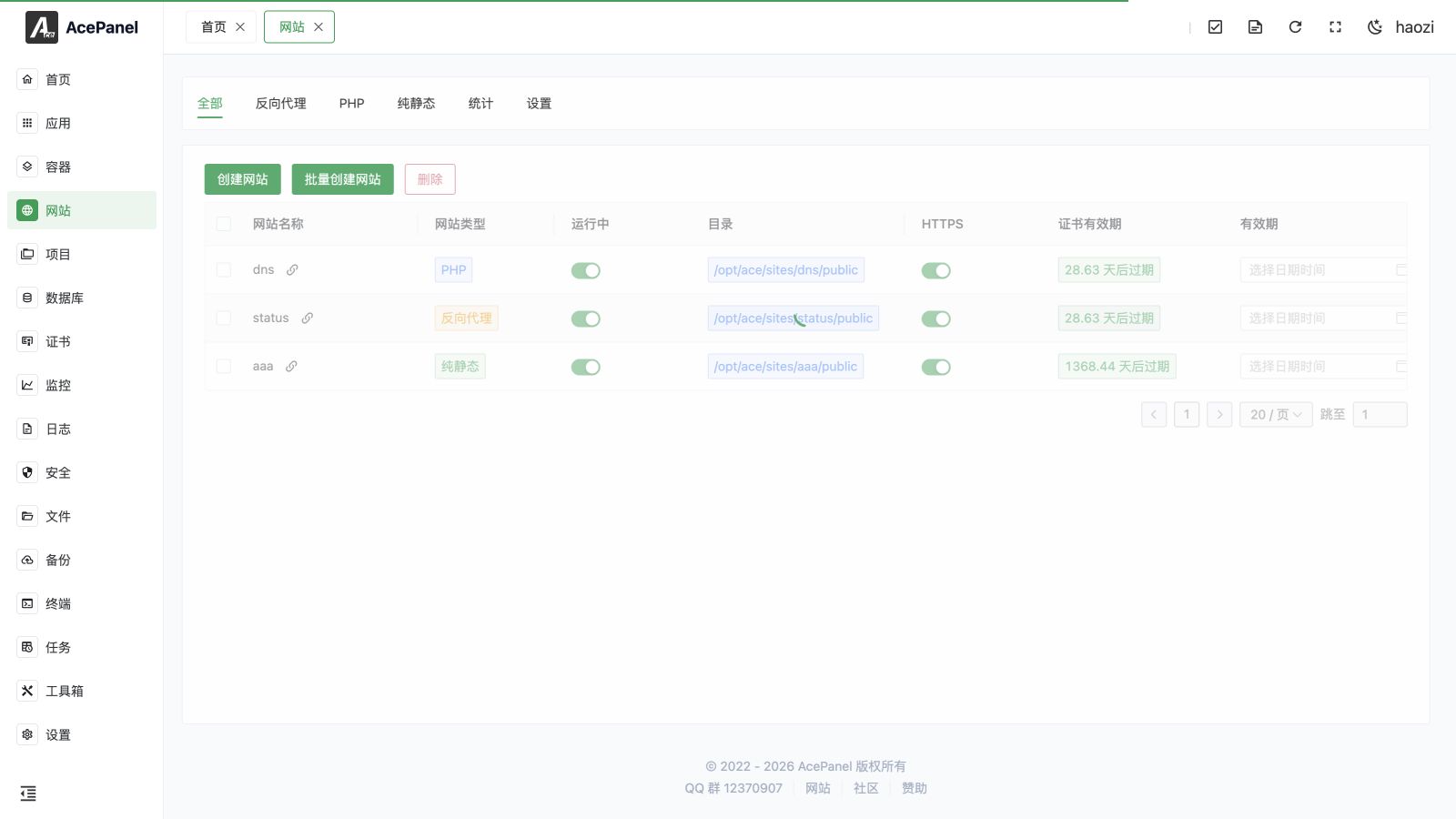
The website module is used to manage site configurations on the Web server. AcePanel supports three types of websites: reverse proxy, PHP, and static.
Prerequisites
Before using the website feature, you need to install a Web server first:
- Go to Apps > Native Applications
- Install Nginx, OpenResty, or Apache
Website Types
| Type | Description | Use Cases |
|---|---|---|
| Reverse Proxy | Forward requests to backend services | Node.js, Go, Java applications |
| PHP | Run PHP programs | WordPress, Laravel, etc. |
| Static | Host static files | HTML, Vue/React build outputs |
Website List
In addition to All, Reverse Proxy, PHP, and Pure Static, the page provides Stats and Settings tabs.
The website list displays the following information:
- Website Name: Unique identifier for the site
- Website Type: Reverse Proxy, PHP, or Pure Static
- Running: Whether the site is enabled
- Directory: Directory where website files are located
- HTTPS: Whether HTTPS is enabled
- Certificate expiration: SSL certificate expiration time
- Expiration: Site expiration time; the site is automatically stopped when it expires
- Remark: Custom remarks
- Actions: Edit, delete, etc.
Create Website
- Go to the Website page
- Select the website type tab (Reverse Proxy/PHP/Static)
- Click Create Website
- Fill in the website information
- Click Create
Common Configuration Items
- Name: Unique identifier for the website, only letters, numbers, hyphens, and underscores are allowed; cannot be changed after creation
- Domain: Bound domain names, multiple can be added (paste comma/space/newline-separated values to add them in bulk)
- Port: Listening port, default 80
- Remark: Optional remarks
Type-specific items:
- Reverse Proxy: requires a Proxy Target (e.g.,
http://127.0.0.1:3000) - PHP: requires selecting a PHP Version, and optionally creating a Database (database name/user/password) together with the site
- PHP / Pure Static: support customizing the website Directory (defaults to
website directory/website name/publicwhen left empty)
Website Management
Click the Edit button of a website to enter the management page, which is organized into tabs:
- Domain & Listening: modify bound domains and listening ports
- Basic Settings: website directory, run directory, default index files
- Upstreams / Proxies: configure backend upstreams and proxy behavior (reverse proxy sites only)
- HTTPS: bind SSL certificates, HTTP redirect, HSTS, OCSP, TLS versions
- Rewrite: set rewrite rules (PHP sites only)
- Redirects: configure redirect rules
- Advanced Settings: access statistics, log settings, rate limiting, real IP, and basic authentication
- Custom Configs: add custom configuration snippets (site-scoped or shared)
- Access Log / Error Log: view the site's logs in real time
Change the Website Type
An existing reverse-proxy, PHP, or pure-static website can be converted to either of the other two types. AcePanel keeps its name, domains, listen addresses, directory, files, HTTPS association, expiration, and other shared fields. It removes the old type-specific Web-server configuration and generates a new configuration for the selected type.
Back up the site before converting it. Upstreams and proxy rules, PHP runtime and rewrite settings, and static-only behavior must be reviewed or configured again after the change. AcePanel tests the generated Web-server configuration before applying it and displays the concrete Nginx, OpenResty, or Apache error when validation fails.
Batch Creation
Click Bulk Create Website to create multiple websites at once, suitable for scenarios requiring rapid deployment of multiple sites.
Delete Website
When deleting a website, a 5-second confirmation countdown is required. You can choose whether to also delete the website directory and delete the local database with the same name. Bulk deletion removes the website directory but keeps the same-name database. AcePanel also removes the website from certificates associated with it and deletes a matching tamper-protection rule.
Next Steps
- Reverse Proxy - Learn how to create reverse proxy websites
- PHP Website - Learn how to create PHP websites
- Static Website - Learn how to create static websites
- Website Settings - Configure default site, IPv6 listening, error pages, and statistics