
Basic Settings
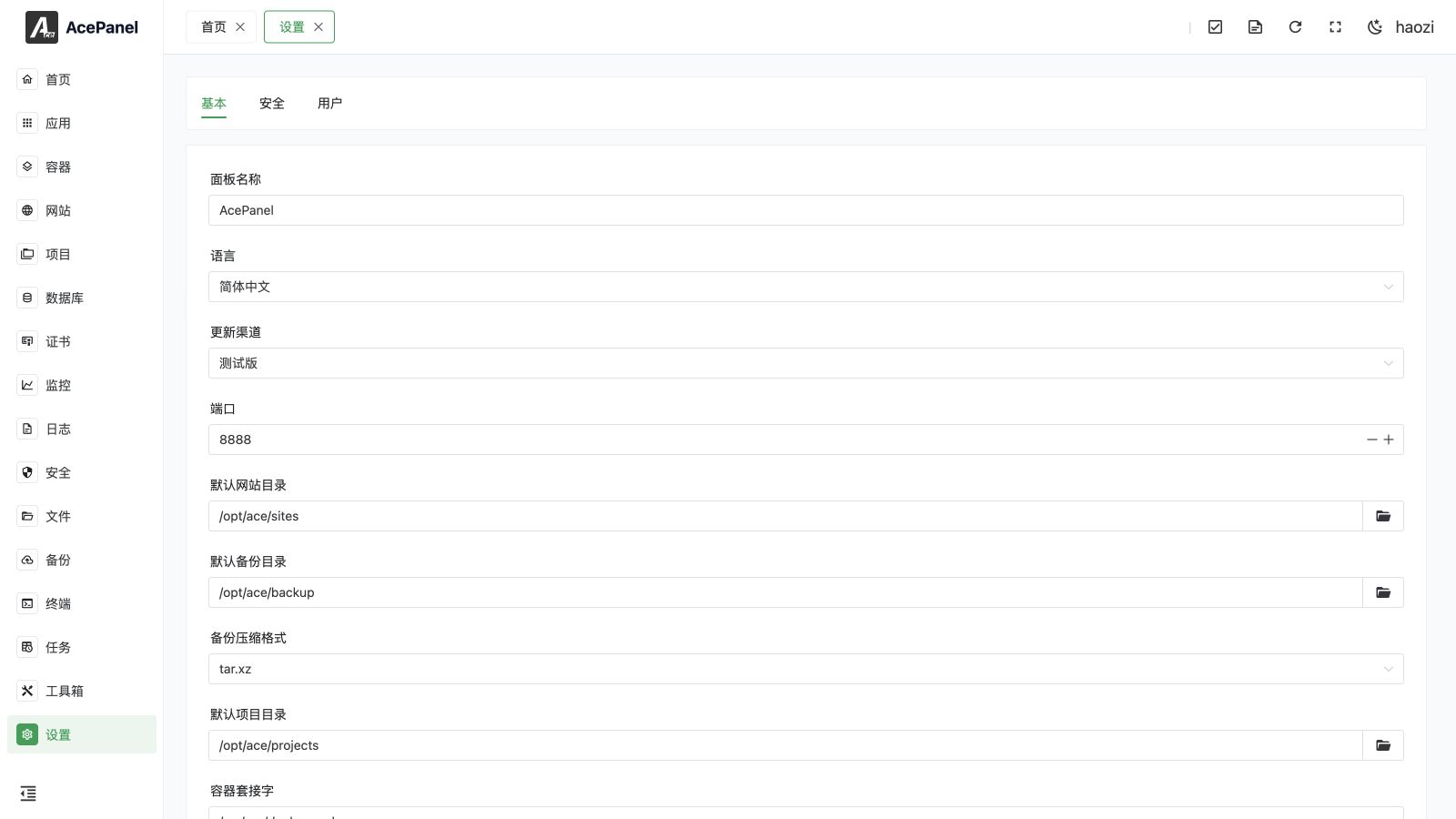
The basic settings page is used to configure the panel's basic parameters.
Panel Name
Customize the name displayed by the panel, default is "AcePanel". After modification, refresh the page to see it displayed in the browser title and the top left corner of the panel.
Language
Select the panel interface language:
- Simplified Chinese
- Traditional Chinese
- English
Update Channel
Select the version channel for panel updates:
- Stable: Fully tested official versions, recommended for production environments
- Beta: Contains the latest features but may have issues, suitable for early adopters
Port
The access port for the panel, default is 8888. After changing the port:
- Ensure the new port is not occupied
- Open the new port in the server security group
- The panel will automatically restart after saving
Note
Before changing the port, please ensure the new port is open in the server security group, otherwise you may be unable to access the panel.
Default Directories
Configure the default storage paths for various resources:
| Setting | Default Value | Description |
|---|---|---|
| Default Website Directory | /opt/ace/sites | Directory for storing website files |
| Default Backup Directory | /opt/ace/backup | Directory for storing backup files |
| Default Project Directory | /opt/ace/projects | Directory for storing project files |
After changing directories, newly created websites/backups/projects will use the new directory, existing ones are not affected.
Backup Compression Format
Select the compression format used when creating backups. Available options are tar.xz (default), tar.gz, tar.zst, zip, and 7z. Choose tar.zst for a good balance of speed and compression ratio, or zip/7z for better cross-platform compatibility.
Container Socket
Specify the path to the container runtime socket, default is /var/run/docker.sock. Adjust this when using a non-default Docker socket location or a Podman socket so that the container management module can connect correctly.
IP Database
Configure the GeoIP database used to resolve the geographic location of visitor IPs (for example in website statistics and the firewall scan awareness module). Three modes are available:
- Disabled: Do not resolve IP locations.
- Subscribe: Provide a subscription URL (default
https://fastly.jsdelivr.net/npm/qqwry.ipdb/qqwry.ipdb). The database is updated automatically every week and must be in IPIP.NET format (.ipdb). - Custom File: Provide the path to a local
.ipdbdatabase file in IPIP.NET format.
Custom Logo
Enter the full URL of an image to replace the logo in the top left corner of the panel. Supports PNG, JPG, SVG, and other formats.
Hide Menu
Select menu items to hide. Hidden menus will not be displayed in the left navigation bar, but the features are still available (by directly accessing the URL).
Suitable for simplifying the interface or limiting the range of features visible to regular users.