
Tamper Protection
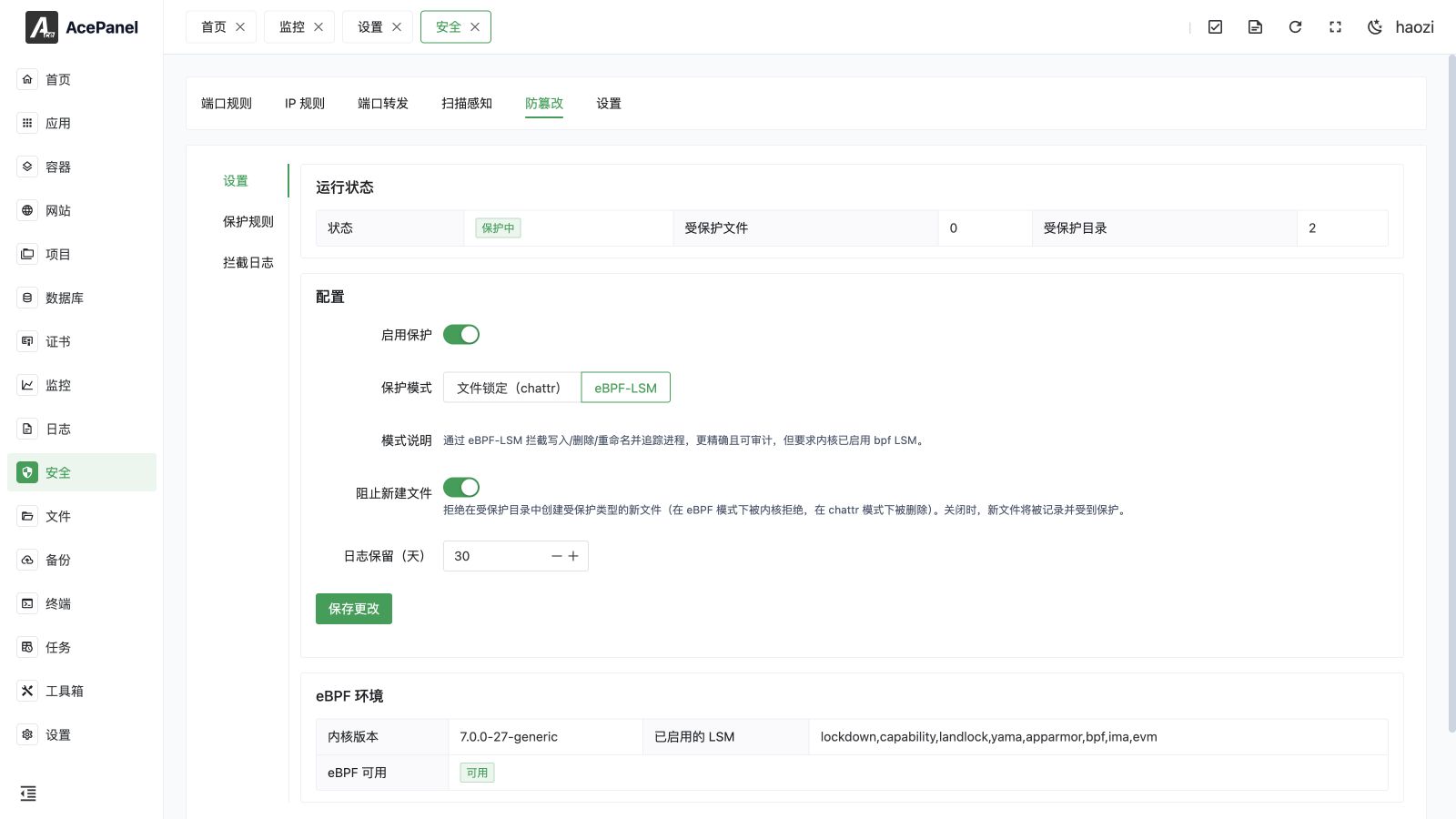
Tamper Protection protects selected website or application files against writes, deletion, renaming, attribute changes, and optionally the creation of new protected file types. It is available only on Linux; other systems display an unsupported-platform message.
Open Security > Tamper Protection. The page has Settings, Protection Rules, and Interception Logs tabs.
Settings and Status
Settings contains the master switch, runtime status, protection mode, new-file policy, and log-retention days. The summary shows the number of protected files and directories. Log retention can be set from 1 to 365 days.
chattr Mode
chattr mode uses Linux immutable and append-only filesystem attributes. It has no BPF LSM or specific kernel-version requirement and is useful for preventing Web-service and other ordinary processes from modifying protected content.
It is not an absolute boundary against root: an administrator can manually remove the filesystem attributes. Empty-extension rules protect all files and place the protected directory under append-only semantics so existing entries cannot be removed or replaced.
eBPF-LSM Mode
eBPF-LSM enforces protection at the kernel security-hook layer. It intercepts writes, unlink, rename, attribute changes, and creation, and records the process name and PID. The running kernel must have the bpf LSM enabled.
If the prerequisite is missing, Activate eBPF and Reboot modifies the kernel boot parameters and immediately restarts the server after a five-second dangerous-action confirmation.
Immediate server restart
Activating eBPF interrupts the panel, websites, databases, containers, projects, SSH sessions, and every other service on the server. Confirm backups and an independent recovery path before continuing.
Block New Files
The policy applies to new files whose type is covered by a rule:
| Mode | Block New Files enabled | Block New Files disabled |
|---|---|---|
| eBPF-LSM | The kernel rejects creation. | Creation is logged and the new file is then added to protection. |
| chattr | A matching new file is detected and deleted. | Creation is logged and the new file is then protected. |
In chattr mode, deletion happens after the new file is observed; only eBPF-LSM rejects creation at the kernel hook before the file is written.
Protection Rules
Each rule contains:
- a name;
- protected directory;
- one or more extensions;
- exclusions;
- enabled status.
Use the website selector to fill a managed site's directory. An empty extension list means all files. An exclusion can be a path fragment or an absolute path; keep it narrow and verify that it does not unintentionally match sensitive content elsewhere in the tree.
Common Workflow
- Back up the target files.
- Create a rule for a disposable or staging directory first.
- Choose chattr or verify eBPF-LSM readiness.
- Enable the rule and confirm the protected-file count.
- Attempt one controlled edit, rename, and new-file creation.
- Review Interception Logs, then enable the rule for production.
Interception Logs
Logs identify write, unlink, rename, setattr, and create operations. Each entry includes time, operation, path, process, and PID. The table supports pagination, refresh, clear, and automatic retention.
Clearing the table is irreversible. Export or record the relevant evidence before clearing during an investigation. A tamper interception can also trigger a notification configured under Monitoring Settings.
File Manager Integration
Files shows a lock and protected/immutable state for affected entries and provides inline and context-menu protection actions. For a supported single-item operation, AcePanel can temporarily remove the immutable attribute, perform the operation, and restore protection. Batch deletion warns that immutable files cannot be removed instead of silently bypassing the policy.
Lifecycle and Recovery
- Deleting a managed website removes its corresponding protection rule.
- When AcePanel restarts, it reconciles the desired rules with filesystem protection state.
- The tamper-protection auxiliary database is included in panel backup maintenance.
- If a protected deployment fails, check both the interception log and the deploying process. Disable or narrow the rule only for the minimum required window, then verify that protection is restored.
Tamper Protection reduces unauthorized file changes; it does not replace least-privilege service users, patching, backups, malware investigation, or firewall controls.